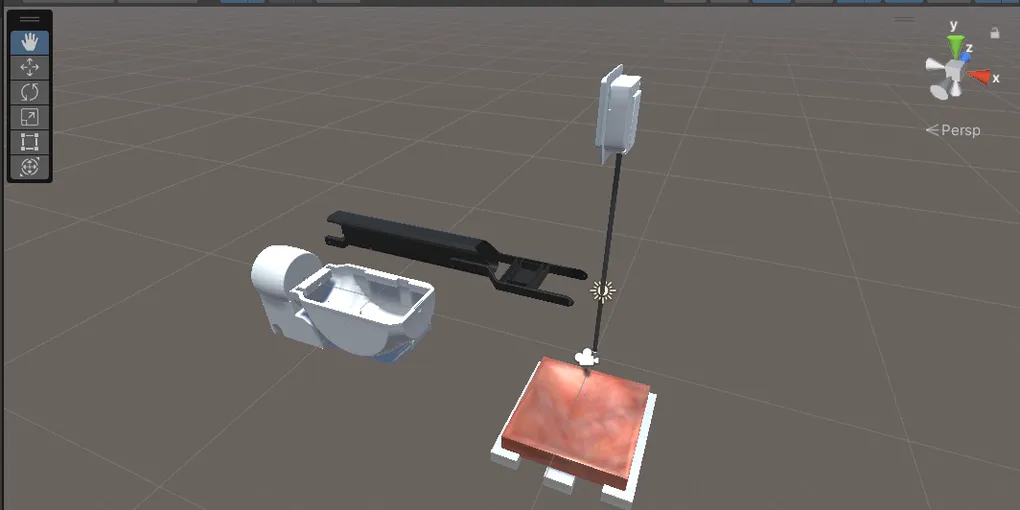
Autonomous Surgical Suction System
An autonomous surgical suction system built with Unity, CRESSim and ROS 2, using computer vision and adaptive trajectory planning to clear simulated blood pools.
The Idea
During minimally invasive surgery, maintaining a clear view of the operating area is essential. When blood pools around the surgical site, it can obstruct the camera and make it harder for the surgeon to see what is happening. Clearing that blood is a repetitive task, but it also needs to be handled carefully and at the right time.
For my bachelor’s project, I explored whether this task could be automated using a robotic suction tool. The idea was to build a system that could detect pooled blood, plan a suction path and respond to changes in the scene, rather than following a fixed movement pattern regardless of where the blood was.
To develop and test the system, I used CRESSim, a Unity-based surgical simulation environment, alongside ROS 2 for the autonomy and control pipeline. This made it possible to evaluate different suction strategies in a repeatable simulated environment and measure how changes to the vision and planning systems affected performance.
The result was a closed-loop system that detected simulated blood pools and directed the suction tool towards them. The adaptive strategy achieved up to 4× faster clearance than the baseline scanning method, while leaving less than 0.05% residual simulated blood volume at matched timepoints.
What You’ll Need
The simulated surgical environment, including blood pooling, suction tool behaviour and the scene used for testing.
View →The autonomy pipeline for suction behaviour, trajectory generation and communication with the Unity environment.
View →Connects the Unity simulation and ROS 2 so that state information and control commands can be exchanged.
View →How It Works
The system is split between two main parts. Unity and CRESSim provide the simulated surgical scene, including the blood pool and suction tool. ROS 2 handles the autonomy side, using information from the scene to select a trajectory and send movement commands back to the simulation.
The two parts communicate through the ROS-TCP Endpoint, creating a closed loop between what is happening in the simulation and how the suction tool responds.
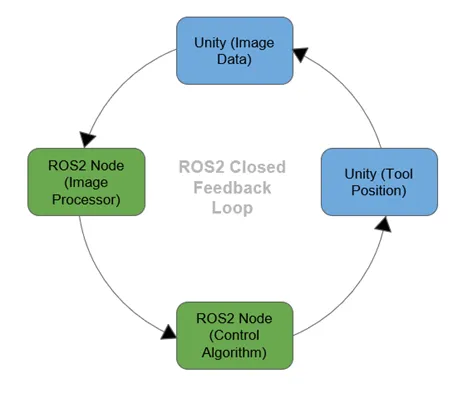
The process works like this:
- Simulate the scene: CRESSim runs the surgical environment, including the blood pool and suction tool.
- Detect the blood: The vision pipeline processes the stereo RGB views and uses HSV segmentation to identify the blood pool.
- Extract the relevant information: The system creates a binary mask and extracts metrics such as the pool’s centroid, bounding box and region of interest (ROI).
- Plan the suction path: ROS 2 uses the available information to generate the next movement for the selected trajectory strategy.
- Send the command back: The suction tool moves in Unity, changing the scene that the vision pipeline observes.
This process repeats continuously, allowing the system to react as the blood pool changes shape or becomes smaller. After optimisation, the complete loop ran at approximately 16 Hz in the simulated environment.
Detecting the Blood Pool
The first challenge was identifying where the blood was and giving the controller enough information to act on it. A fixed scan of the entire workspace can clear a pool, but it spends time moving through areas that do not need attention. To make the suction process more efficient, the system needed to identify the part of the scene that mattered and update that information as the pool changed.
The vision pipeline used HSV colour segmentation to separate the simulated blood from the surrounding scene. It generated a binary mask and extracted useful measurements, including the pool’s centroid, bounding box and perimeter. These measurements provided the controller with a compact description of the pool’s current position and extent.
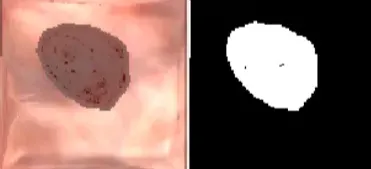
An important part of the optimisation was keeping the heavier image-processing work inside Unity. Rather than continuously sending full RGB images to ROS 2, the pipeline sent the information needed for planning. This reduced the amount of data crossing the bridge and avoided making the controller process image data that it did not need.
The pipeline also used a cached bounding box and region-of-interest processing. After the initial detection, segmentation could focus on the relevant part of the scene rather than repeatedly processing the entire image. This reduced unnecessary computation while keeping the detected region updated as the blood pool changed.
Planning the Suction Path
Detecting the blood pool is only part of the problem. The suction tool also needs a movement strategy that can clear the pool efficiently. A path that works well at the beginning may become less useful as the blood is removed, fragments into smaller areas or changes shape.
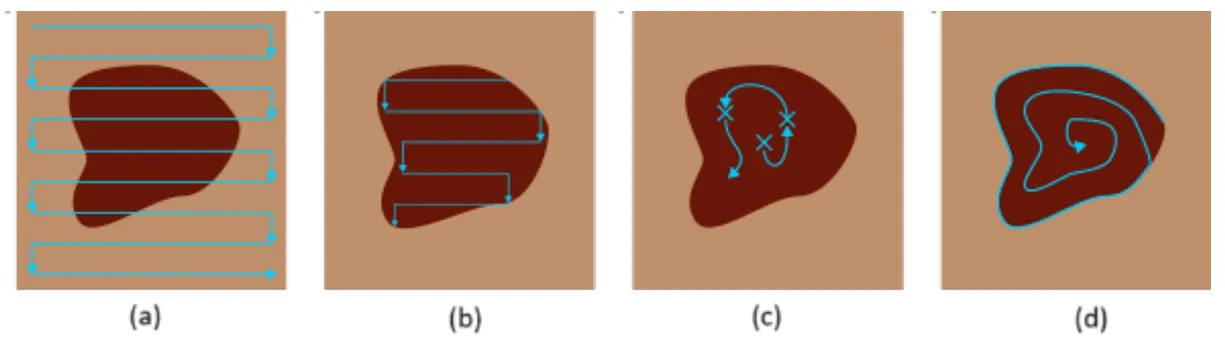
I implemented and evaluated four trajectory strategies to compare how they behaved in the same simulated workspace. The trajectory strategies are presented below: (a) Global Zigzag, (b) Adaptive Zigzag, (c) Centroid Follower, and (d) Inward Spiral.
Global Zigzag
The Global Zigzag was the baseline. It follows a raster-style pattern across the full workspace, systematically covering the area rather than focusing only on where blood remains. This makes it a useful reference because the path does not depend on continuously updating a target region, but it can spend a large amount of time traversing empty space.
Adaptive Zigzag
The Adaptive Zigzag uses the detected region of interest to restrict the raster path to the area where blood is present. As the pool changes, the region can be updated so the tool spends less time moving across parts of the workspace that do not need to be cleared.
This was the strongest strategy in the tests. By reducing unnecessary traversal, it achieved around four times faster clearance than the global scanning baseline and the lowest residual volume at matched timepoints.
Centroid Follower
The Centroid Follower moves in relation to the detected centre of the blood pool. This can reduce the pool quickly at the start, when there is a clear central target. However, as the pool is removed and breaks into smaller regions, the centroid can shift and the strategy becomes less stable.
Inward Spiral
The Inward Spiral follows a contour-based path from the outside towards the centre. It offers another way to cover the target region, but in the evaluation it was slower and less complete than the adaptive approach, leaving approximately 17% residual volume in the reported tests.
Improving the Unity–ROS 2 Pipeline
Trajectory planning was not the only factor affecting performance. The system also needed to move information between Unity and ROS 2 without creating unnecessary communication overhead or delays in the control loop.
Reducing Message Volume
Originally, the pipeline was sending two stereo RGB streams at approximately 30 frames per second each. That meant large image messages were continuously crossing the Unity–ROS bridge, creating unnecessary traffic and contributing to message backlog and timing jitter.
The pipeline was restructured so the image processing stayed inside Unity and ROS 2 received the information required for suction planning, including the binary mask and region metrics. This reduced ROS message volume by approximately 80%, helping the controller respond more consistently.
Reducing Per-Frame Processing
Full-frame HSV thresholding and repeated contour extraction also added work to each vision update. By focusing processing on the current region of interest and caching bounding-box information, the pipeline avoided repeating the same calculations across the entire image when they were not needed.
This reduced per-frame compute time by approximately 40%. Together with the lower message volume, the changes helped reduce latency spikes and maintain a more consistent closed-loop update rate.
The key lesson was that making an autonomous system faster is not only about choosing a better trajectory. The way information moves through the system matters just as much as the movement strategy itself. A more focused vision pipeline, smaller messages and less unnecessary traversal all contributed to the final performance.
Testing and Results
The system was evaluated in a simulated workspace measuring approximately 200 mm × 200 mm, with a simulated blood pool described in the test setup as approximately 100 ml. The same environment was used to compare the trajectory strategies and profile the vision, communication and planning pipeline across repeated trials.
The adaptive strategy performed best overall, but the profiling also showed that improvements to data transfer and image processing were important for maintaining a stable control loop.
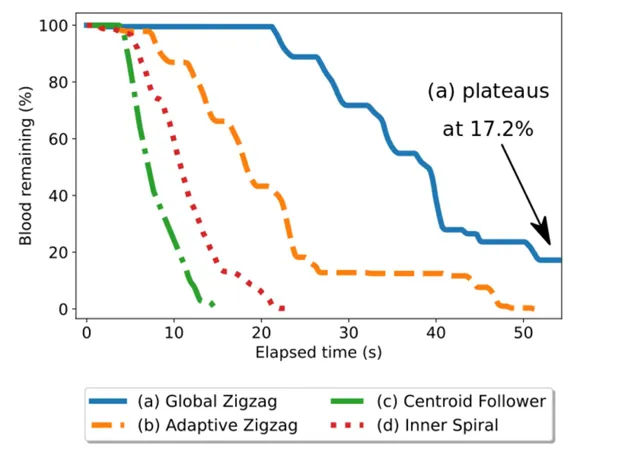
The main results were:
- Up to 4× faster clearance than the Global Zigzag baseline using the Adaptive Zigzag strategy.
- Less than 0.05% residual simulated blood volume at matched timepoints.
- Around 80% less ROS message volume after moving heavy segmentation work inside Unity and sending the required mask and region metrics instead of full RGB streams.
- Around 40% lower per-frame compute time following region-of-interest processing and cached bounding-box updates.
- Approximately 16 Hz closed-loop operation, with the reported total loop time below 60 ms.
- Less than 5% variance across repeated trials for the Adaptive Zigzag results reported in the project evaluation.
These results show how trajectory selection and pipeline optimisation can work together. The adaptive path reduced unnecessary movement, while the communication and vision changes helped the controller receive updated information without the same volume of data and repeated processing.
What’s Next
There are several areas I would explore to take the system further. The current work focuses on clearing a blood pool in a simulated workspace, so one direction is adding depth-aware Z-axis control to support movement across more varied three-dimensional geometries.
Another area is improving segmentation under different lighting conditions and when the blood pool is partially obscured. A more robust vision pipeline would help the controller deal with a wider range of simulated scenes and make the system less dependent on a particular visual setup.
The longer-term challenge is evaluating how the approach could transfer from simulation to physical robotic hardware. The results reported here are from a simulation environment; the system has not been clinically validated or demonstrated as a deployed surgical tool.
Conference Paper
This work was accepted as a two-page paper at the 14th Conference on New Technologies for Computer/Robot Assisted Surgery (CRAS 2025) in Lisbon.
Read the CRAS 2025 conference paper
Explore the Code
The project is split across the simulation environment and the ROS 2 autonomy workspace. The repositories include the Unity/CRESSim scene, suction tool behaviour, ROS-TCP Endpoint integration, control logic and trajectory planning.